

Magicline
- Member and club context
- Check-in process
- Registered RFID media
- Partner integration activation
- Open API authorisation
Magicline partner integration
Gymlock connects Magicline check-ins and existing RFID media with electronic locker management. Member processes remain in Magicline, while Gymlock manages locker rules, occupancy, door and lock states, and operational interventions.
What is connected?
Check-in and existing member processes continue to run in Magicline. The authorised integration provides Gymlock with the member, check-in, and RFID information required for the locker workflow.
Gymlock applies the configured locker rules. Members can keep using compatible existing cards or wristbands, while the club team monitors occupancy and device states centrally.
From check-in to locker
Each system retains its own responsibilities and exchanges the information required for operation through the authorised integration.
The member checks in with their existing member medium. Magicline remains the leading system for the check-in process.
Relevant member, check-in, and RFID information is made available to the Gymlock integration.
Gymlock considers free or fixed assignment and the maximum number of lockers a member may occupy at the same time.
The member uses their compatible RFID medium. Occupancy and door and lock states become visible in Gymlock.
Clear responsibilities
The integration adds specialised Gymlock locker operations to Magicline without replacing established club processes.
In daily club operations
Define how many lockers a member may occupy at the same time. Gymlock applies the configured rule during use.
Staff can search for the member or RFID medium and identify the currently occupied locker in Gymlock.
Authorised staff can open a locker remotely, review occupancy, and make blocked lockers available again.
Both systems at a glance
The integration connects the Magicline process with operational views in the Gymlock Console and Platform.
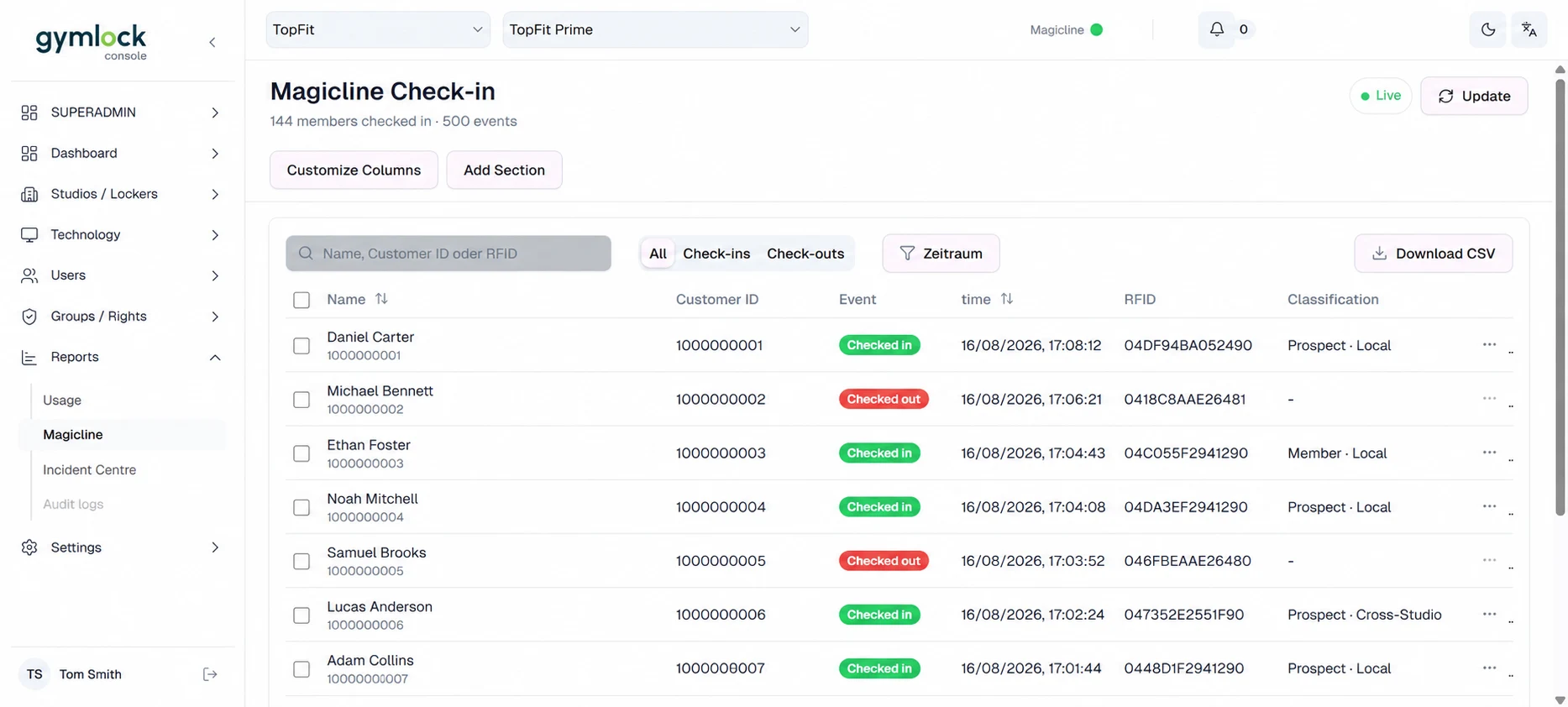
Check-ins and check-outs can be traced centrally by member, customer ID, and RFID medium. All displayed person, customer, and RFID data is synthetic.
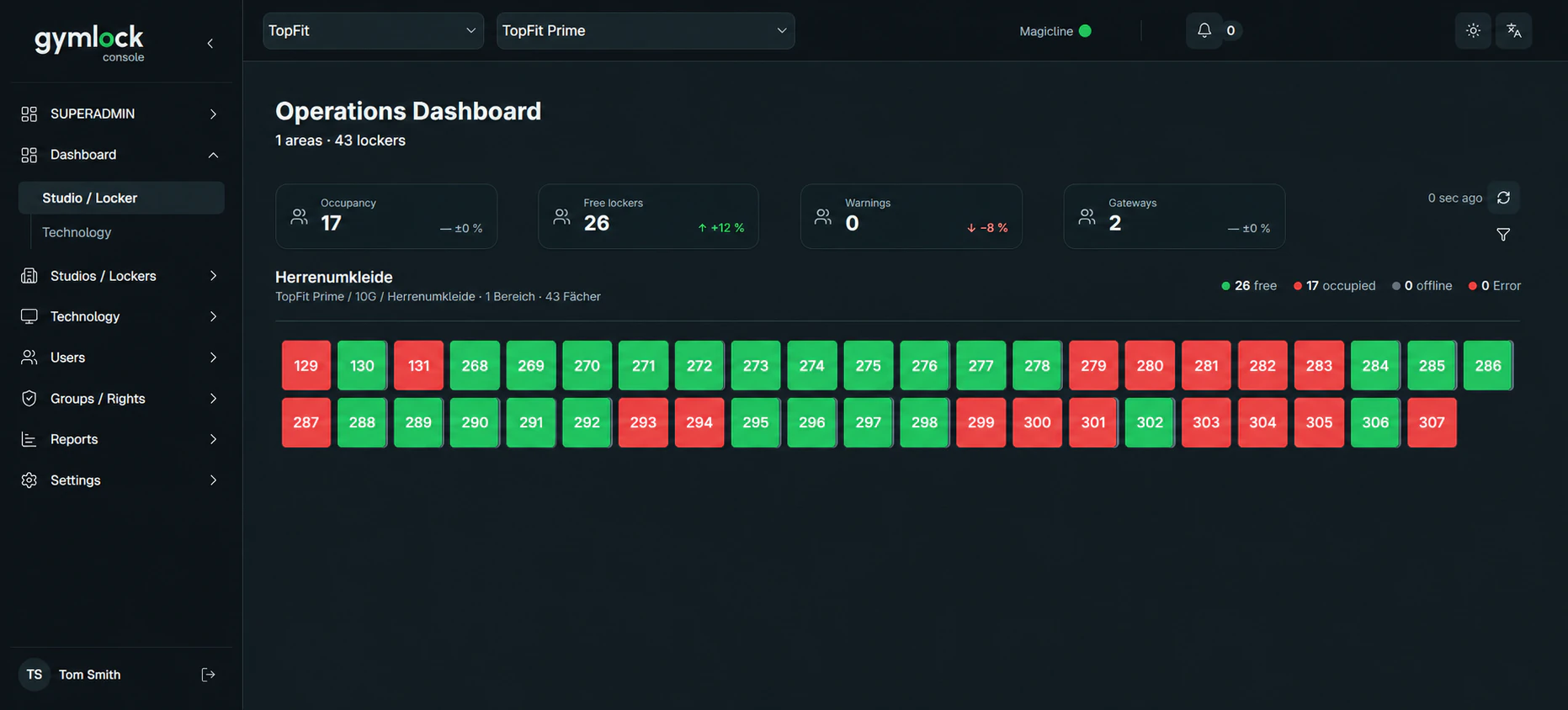
Club teams can see locker areas, occupancy, and operational states in the central Gymlock interface.
Offline behaviour
Relevant operational and permission data is held locally on the Gymlock Device Gateway. This allows normal locker operation to continue during a temporary internet interruption.
Changes from Magicline or the Gymlock Cloud are not transferred immediately during the interruption and are synchronised after the connection is restored.Setup
Technical and operational setup is completed once per customer or location and concluded with a test run.
Configure the Gymlock installation with lockers, Device Hubs, and gateways.
Activate Gymlock in the Magicline Marketplace for the relevant customer or location.
Authorise the required Magicline Open API access.
Assign Magicline clubs or locations to the corresponding Gymlock installation.
Configure free or fixed assignment, maximum occupancy, and staff permissions in Gymlock.
Perform a test check-in and locker use, then release the integration for regular operation.
Frequently asked questions
Yes. RFID media already registered in Magicline can be used with Gymlock if their technology and identifier are compatible with the selected Gymlock configuration. Compatibility is checked during planning.
Gymlock lets operators configure the maximum number of lockers a member may occupy at the same time. Additional occupancy can then be prevented according to that rule.
Club staff can search Gymlock by member, customer ID, or RFID medium and identify the currently assigned or occupied locker.
Normal operation with permissions already available locally continues during a temporary internet interruption. New changes from Magicline or the cloud are synchronised after the connection is restored.
Magicline remains the leading system for member and check-in processes. Gymlock manages lockers, assignments, usage rules, occupancy, device states, and operational opening and release functions.
A Magicline package suitable for partner integrations, an available integration slot, and authorised Open API access are required. Availability is checked in the relevant Magicline account.
Yes. Magicline locations can be assigned to the corresponding Gymlock installations, and multiple clubs and locker areas can be managed centrally in Gymlock.
We review your existing RFID media, locations, locker rules, and the technical requirements for the integration.